What is your favorite feature in ReSharper?

June 5th, 2006 by ObfuscatorTo be perfectly honest, it’s impossible to choose a single most valuable feature in ReSharper. Some say it’s on-the-fly error highlighting, some hail the versatile refactorings, while many go crazy for smart name code completion. Well, different strokes for different folks. For now, I would like to focus on one neat little feature that will save you tons of time regardless of your coding style: Go to Type.
The idea is simple. To navigate to any type, all you need is its name.
Press Ctrl + N and start entering the type’s name. You will see the list of matching types in your solution:

The list is filtered as you enter more letters. Once you see the desired type, select it to navigate to its declaration.
You can further accelerate this process with one or more wildcard options:
- CamelCase search is supported in Go to Type. If you insert upper case letters in the search box, the filtered names are allowed to skip any number of lower case letters but must include the upper case ones in the order specified in the search string.
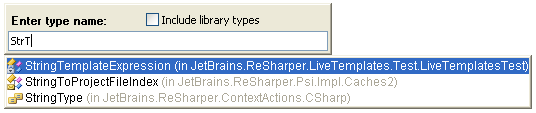
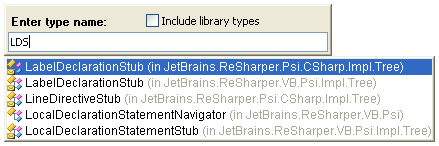
In the example above, the search string includes some upper case letters as well as some lower case ones. Alternatively, you can enter only upper case letters, resulting in very precise filtering. For instance, to go to LabelDeclarationStub, enter LDS:
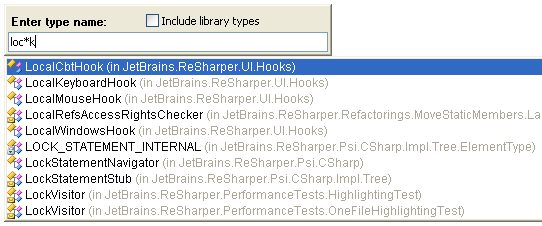
- Insert * (asterisk) to represent 0 or more characters.
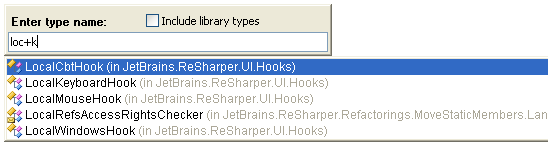
- Insert + (plus sign) to represent 1 or more characters.
- Insert ? (question mark) to represent 0 or 1 characters.
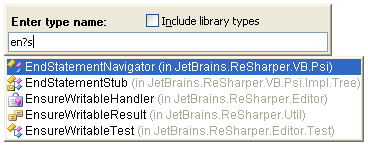
Go to type and enjoy it!
Would you like to tell us about your favorite feature in ReSharper? Leave your comment below
June 6th, 2006 at 9:49 am
New Jetbrains .Net Tools blog
From Larkware’s Daily Grind: New JetBrains .NET Tools Blog - For all your ReSharper needs.
On of their…
June 6th, 2006 at 8:41 pm
JetBrains .NET Tools blog
The teams from JetBrains behind the .NET tools ReSharper and the dotTrace Profiler have started…
June 6th, 2006 at 8:43 pm
This is a great idea to start to blog about both the tools!!
June 6th, 2006 at 11:50 pm
JetBrains .NET Tools Blog opened
June 7th, 2006 at 1:37 am
keep m coming. I am goiing to love your tips
June 7th, 2006 at 5:57 pm
Thanks for your nice comments, folks
Looks like we got a vote from Luke Melia. His pick is the Introduce Variable code refactoring.
We’ll be sure to cover this and other refactorings in the near future. Stay tuned!
June 9th, 2006 at 12:37 pm
By the way, you missed another feature of Go to Type - common prefix completion with Tab key.
Suppose you typed “S” have in Go to Type classes SomeClass1, SomeClass2, SomeClass3, and so on. Pressing Tab key will complete the search string to “SomeClass”.
June 13th, 2006 at 5:03 pm
You also can use Space at the end of the search string to match the end of a type name. For example,
"*test "will find all types whose names end in “test”.June 13th, 2006 at 5:32 pm
Thanks for your comments, Andrey! I especially like the trick with using Space.
June 26th, 2006 at 5:40 pm
quickly speed while Reflect a lot of assemblies which a project reference!!!!!!!!!!!!!!!!!!!!!!!!!!!!!!!!!!!!!
July 28th, 2006 at 6:56 am
- Your add-in DOESN’T have a simple Enable/Disable menu item.
- Your add-in DOESN’T stop after I unchecked it in Add-ins Manager.
- Your add-in DOES start automatically again and checked itself in Add-in Manager in next time I use VS.
It’s suck.
