ReSharper 5 Beta 2 Released
February 17th, 2010 by Jura GorohovskyIn an irrepressible pursuit of deadly perfection, we’re releasing ReSharper Beta 2 today! Committed to sim-ship ReSharper 5.0 with Visual Studio 2010, we’ve fixed a ton of issues, from minors to show-stoppers. Here are some of the most conspicuous:
- Support for Visual Studio 2010 RC. This inevitably means that R# 5 Beta 2 is not compatible with Visual Studio 2010 Beta 2. If for any reason you need ReSharper to be compatible with VS 2010 Beta 2, download build 1611 or earlier from ReSharper Nightly Builds.
- Extended ASP.NET MVC functionality. ReSharper 5.0 Beta 2 supports ASP.NET MVC 2 Areas — like so:
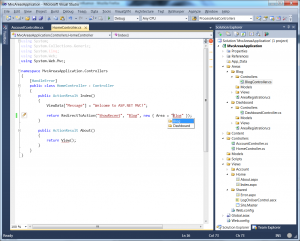
Other notable improvements include creating MVC View pages and user controls with or without master pages right from usage. - Stable Structural Search and Replace. SSR is now actually working working in a much more stable fashion than late last year, when we released Beta 1. That means, if you know about a code smell that ReSharper is unaware of, no problem! Create a search/replace pattern:
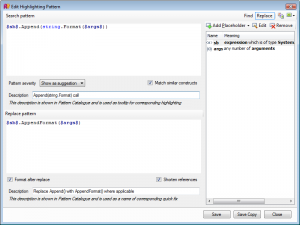
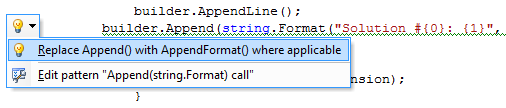
and execute it! You can also set a severity level for the pattern so that ReSharper highlights code matching the search pattern as a hint, suggestion, warning, or error, and provides quick-fixes:
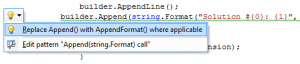
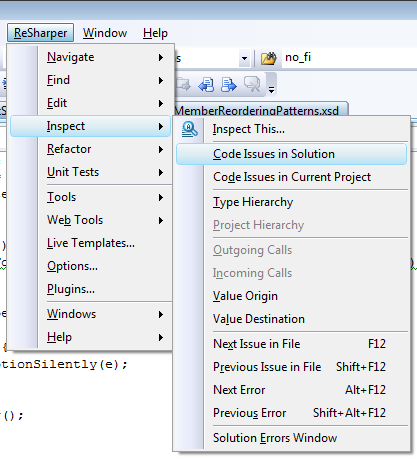
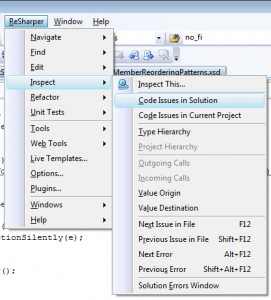
By the way, you can now share your patterns with fellow developers by importing/exporting them as XML files. - Multiple usability improvements. Usability improvements in ReSharper 5.0 Beta 2 affect many features, including the aforementioned Structural Search and Replace; Localization feature pack (by the way, have you seen Hadi Hariri’s Localizing Your Applications with ReSharper 5 screencast? you should!) and Solution-Wide Warnings and Suggestions that you can now launch not only from the Solution Explorer but from ReSharper menu as well:
Download ReSharper Beta 2 now and remember that all new and upgrade licenses purchased since October 15, 2009 qualify for a free upgrade to ReSharper 5.0!
If you haven’t yet upgraded to ReSharper 4.5, right now could be the time to do so - and enjoy the new ReSharper 5.0 for free when it comes out later this spring.
Tags: ReSharper, ReSharper 5

February 17th, 2010 at 11:25 pm
Social comments and analytics for this post…
This post was mentioned on Twitter by resharper: ReSharper 5 Beta 2 Released. Read all about it! http://bit.ly/c5yUOu...
February 18th, 2010 at 12:02 am
Link in the first paragraph titled “ReSharper Beta 2″ redirects to R# 4.5 download page, you might wanna fix it
February 18th, 2010 at 7:06 am
Вышел ReSharper 5 Beta 2…
Thank you for submitting this cool story - Trackback from progg.ru…
February 18th, 2010 at 11:32 am
[...] ReSharper 5 Beta 2 Released - JetBrains announce the release of ReSharper 5 Beta 2 which now includes support for the Visual Studio 2010 Release Candidate along with improved ASP.NET MVC 2 support along with improvements in usability and in the structural search functionality [...]
February 19th, 2010 at 4:57 pm
Now that you’ve got menu items to show “Code Issues in Solution” and “Code Issues in Current Project”, are there any plans to add “Code Issues in Open Files” (which would address RSRP-88095)? Seems like this would be relatively easy to add, and it would be very helpful. (E.g. it could help me see whether I accidentally added unused “using”s to files I was just editing.)
P.S. I got a “Could not open socket” page when I tried to submit this comment a moment ago.
February 20th, 2010 at 4:23 am
[...] Learn more and download it. Categories: Uncategorized Tags: Addon, Visual Studio Comments (0) Trackbacks (0) Leave a comment Trackback [...]
February 20th, 2010 at 9:28 pm
Resharper 5 beta 2…
Un petit billet pour vous informer, si vous ne l’étiez pas déjà bien sûr, de la disponibilité toute récente de Resharper en beta 2 s’il vous plait! A télécharger donc d’urgence si vous bossez sous VS2010!…
February 21st, 2010 at 12:38 am
I only have 19 days left of my 5.0 beta evaluation. Will i be able to extend that until the release date?
February 21st, 2010 at 2:02 pm
@Joe
Quite likely but not for 5.0. We’ve passed feature freeze.
The original motivation for adding the two “code issues” menu options was that “Inspect Code” in Solution Explorer was too far from other R# actions to be noticed straight away
@JimBob Once your current beta build expires, you’ll be able to download a fresh nightly build and use it for another 30 days
February 22nd, 2010 at 1:32 pm
Is there a release date for Resharper 5?
February 22nd, 2010 at 2:04 pm
@Martin
We’re sim-shipping with Visual Studio, so expect R# 5 to be released in April.
February 26th, 2010 at 3:33 pm
I feel so sad about resharper 5. After the beta version was released, I had already told you it cannot work well with DevExpress Refactor,link: http://blogs.jetbrains.com/dotnet/2009/12/resharper-50-beta-comes-out/
but you still not fix this problem in beta 2 version!
February 26th, 2010 at 3:55 pm
@lxiaor
We have a bug tracker at http://youtrack.jetbrains.net/issues/RSRP
If you encounter a bug, please submit it there. Don’t submit reports about two or more bugs, submit them one by one. Leaving bug reports in the blog is not the best idea, chances are they’ll end up unnoticed.
To even have a chance of fixing your particular bug, we need to know which Visual Studio version you’re using, which DevExpress tools you’re using and possibly other details about your machine configuration.
March 2nd, 2010 at 5:44 pm
I have to wait until April to send you my money for ReSharper 5!? A travesty! Beta 2 rocks though. Thanks for making cool stuff guys. I couldn’t live without it.
March 2nd, 2010 at 5:57 pm
@ncloud
Thanks for appreciating!
We might start pre-selling 5.0 before April but we’ve not come to a final decision on this.
March 3rd, 2010 at 9:41 pm
Installing beta 2 with beta 1 installed did not allow me to install. I had to uninstall beta 1 then install beta 2 which took longer and probably lost my settings.
March 3rd, 2010 at 9:50 pm
@Geoff,
Sorry for that. AFAIK we didn’t receive reports on your kind of problem before.
March 12th, 2010 at 6:05 pm
Using visual studio 2008, with with latest release I can’t seem to be able to edit .aspx files. When I try to type it takes what seems like 10 seconds for my characters to appear on the screen after I typed them.
the problem does not appear to be as bad when editing .cs files, but when in .aspx file the problem magnifies 10 fold.
This one problem makes it completely unusable for me.
I was looking forward to version 5, but unfortunately I had to revert back to 4.5.
March 18th, 2010 at 7:44 am
It seem that it does not work on VS RC1 2010 but works perfectly on 2008
March 25th, 2010 at 1:07 pm
Resharper 5 is still a very buggy version of the buggiest tool I could never live without. I use it because I’m using VS2010 and I could never live without Resharper.
But calling it ‘RC’ worries me somewhat. Do you actually intend to fix the bugs? It’s behavior is kind of random most of the time because it throws a few hundred unhandled exceptions every day.
April 8th, 2010 at 3:01 am
Does 5.0 have support for F# ?
April 8th, 2010 at 3:48 pm
@Alun,
We’ve already fixed many bugs since the RC release. Try out a fresh EAP build (pay attention to comments though): http://confluence.jetbrains.net/display/ReSharper/ReSharper+5.0+Nightly+Builds
@Sunit
No, 5.0 doesn’t support F#, and it’s not planned in the near term.
April 24th, 2010 at 11:18 pm
Let’s vote for F#
http://youtrack.jetbrains.net/issue/RSRP-178987