

How-To's


dotPeek 1.0 Beta Available
If by now you can’t recall what dotPeek is, it’s our free .NET decompiler, and it goes Beta today. Please go ahead and download dotPeek 1.0 Beta for your daily dose of awesomeness.
Since the emergence of the previous dotPeek build that added base types and inheritors to Assembly Explorer, the dotPeek crew has introduced a whole bunch of great stuff that’s exposed in this Beta. Here’s the list:
- Installer. dotPeek EAP used to be distributed as a simple zip archive, making managing versions a bit of a mess. It’s refreshing that on the verge of final release, there’s finally an installer.
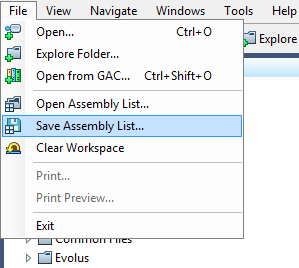
This has an additional implication: whether you choose to integrate dotPeek with Windows Explorer is now set from the installer, not from dotPeek Options. - Assembly management. Here’s another piece of must-have functionality that was previously unavailable: You can now work with different assembly lists depending on your context. You can save and reopen assembly lists, and clear the current list if you no longer need it. Assembly lists are actually not limited to .dll and .exe files: they can contain archives and folders (see below.)
- Open archives and folders. In addition to traditional assemblies and executables, you can have dotPeek open archives (including .zip, .vsix, and .nupkg formats), and also folders. When you ask dotPeek to explore a folder, it processes all its subfolders in hunt for files that it is able to decompile.
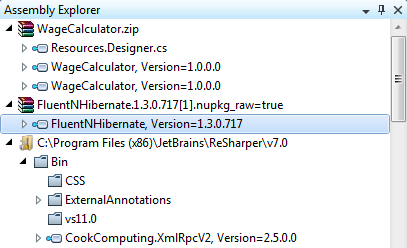
Since you can also open files from the web by passing an URL to the Open dialog, support for archives opens up some nifty scenarios like opening NuGet packages from GitHub or .zip files attached to a bug report in one go. - Support for .winmd files. If you’re playing with VS11 Beta and WinRT, you’re going to appreciate that dotPeek can now show contents of .winmd files
- An option to show compiler-generated code. This switch turns off certain compiler transformations, making code structure very similar to what the compiler turns it to. This helps see how compiler deals with lambdas, closures, and auto-properties, among other things.
- Add to this several important fixes and optimizations such as caching the contents of Open from GAC dialog box, and sorting out issues with key accelerators.
Feels like it’s entirely worth it to download dotPeek 1.0 Beta, doesn’t it? If the build is any worse than a smooth ride, please let us know and we’ll be fixing critical issues ahead of the upcoming release.
Prev post Searching for Patterns in HTML using ReSharper 6Replacing Tags and Custom Code Analysis in HTML Next post
Subscribe to a monthly digest curated from the .NET Tools blog:


