Enabling Implicit Context Variables Resolution in Template Files

August 6th, 2009 by Alexey ChmutovBecause almost any template file has external references to context variables (and we’ll eventually find their declarations in code rendering that file), we need to introduce declarations for such implicit variables. IntelliJ IDEA helps us to do this in familiar comment-based way: @vtlvariable comment declares name, type and optional scope file for implicit variables; variable type is inferred from method and #foreach usages. Let’s have a look at the latter variant.
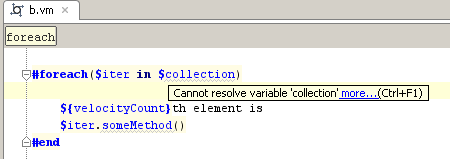
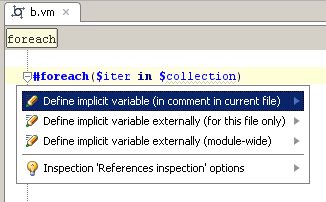
Press Alt+Enter on an unresolved collection reference and select a current file declaration:
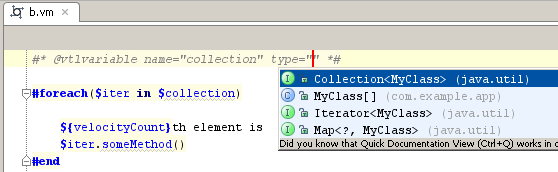
Appropriate types of Velocity iterables are shown:
It might be undesirable to spread IDE-specific @vtlvariable comments across an entire project, especially in a mixed-IDE team. So, IntelliJ IDEA allows to place all these comments in a single file and use external variable declaration:
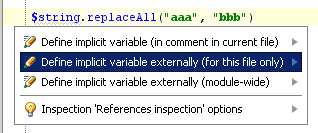
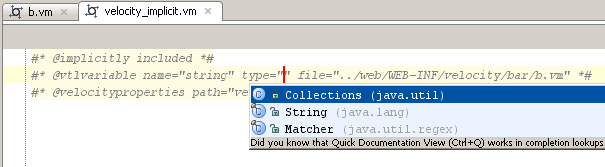
An implicitly included file is used for storing the declaration comment and file attribute that determines the scope file for declared variable:

Tags: freemarker, Template languages, velocity

August 8th, 2009 at 4:11 am
While variable resolution is a must for usable Velocity support, polluting the template files with such comments is not the best idea IMHO.
Different frameworks(that use velocity) will use different methods to fill the context with variables (and for many of them the variable “tree” can be huge).
I think a much better and general approach would be to let the user set in the Velocity Facet a sort of “template variable provider” class.
For this “template variable provider”, one approach could be similar to a “JDBC driver” (and would not depend on IntelliJ), that each framework (that needs Velocity) could implement (in a much simpler way than making an IntelliJ plug-in right now).
July 28th, 2010 at 9:12 am
Is there any way to do something like this outside of Velocity? I work on a large ColdFusion app with a lot of static functions loaded into server space, and called like this:
Server.MyApp.UDF.util.someFunction();
Server.MyApp.UDF.xml.someFunction();
There are thousands of references like this in our code that a) are all flagged as unresolved, and b) don’t provide argument hints.
The path segments at the ‘util’ and ‘xml’ level above correspond to physical cfm or cfc files, and I’d really like some way to tell IDEA on a project- or module-wide basis that to resolve this:
Server.MyApp.UDF.xml
…it should look for the function here:
/ProjectRoot/udf/util.cfm
November 24th, 2011 at 8:18 pm
Any way of doing this for macro parameters, i.e.
#* @vtlvariable name=”page” type=”xxx” *#
#macro (foo $page)
$page.attribute <— get’s a grey squiggly
…
