


Console folding customization
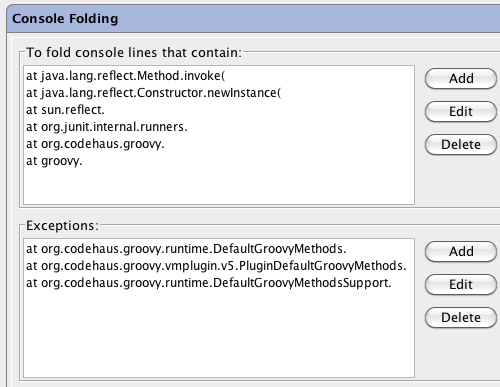
July 12th, 2010 by Peter GromovOnce I wrote about console folding for Groovy stacktraces. Naturally, many people wished similar things could work for other languages and frameworks. Long story short, there’s now a settings page dedicated to the console folding. It provides a settings page where you may specify which console lines to fold:
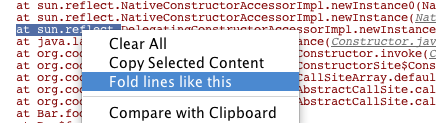
This functionality is available in IDEA 9.0.2 via Console Folding plugin. In IDEA X, it will be bundled. Furthermore, there will be a nice addition to these settings: an action that allows you to add folding rules very easily right from the console. Just select the fragment which will toggle the folding of the lines containing it, and right-click:

July 12th, 2010 at 6:31 pm
Can you add an option to just omit the lines?
July 12th, 2010 at 7:29 pm
Can this be used to suppress the many repetitions in a stack overflow exceptions caused by unbounded or excessive recursion?
July 13th, 2010 at 12:00 pm
Jason, just omitting the lines is not possible at the moment, and I suppose that would be misleading. Actually the folded stack traces look almost as if the lines were omitted, there’s just something gray saying ‘n internal calls’ on the right.
Randall, this can make the repetitions shorter and easier to recognize, that’s it. No suppression yet, and I can’t imagine how that would look like.
July 22nd, 2010 at 10:31 pm
I’m running IDEA 9.0.2 without the Console Folding plugin installed. And yet, stack trace lines under sun.reflect.* and java.reflect.* are being folded in the Run console. Is it possible to turn this off? A search in settings for “console folding” pointed only to “Colors & Fonts”.
July 23rd, 2010 at 2:34 am
Cameron,
Unfortunately, no. In IDEA 9 the only way to turn off console folding is to disable the Console Folding plugin.
July 27th, 2010 at 8:21 pm
Hi Peter:
Thanks for the reply!
I cannot disable the plugin because I do not have it installed; it is not listed under the Settings->Plugins->Installed tab. And yet, IDEA 9 is still folding sun.reflect.* and java.reflect.*.
July 28th, 2010 at 4:01 am
Cameron,
I see, sorry for misreading you. There’s really no possibility to turn this off in 9 on user level. But, if you want it very-very-very much, you can go to lib/resources.jar/META-INF/IdeaPlugin.xml and comment out the following line:
<stackFrameFilter implementation=”com.intellij.execution.filters.ReflectionStackFrameFilter”/>
August 2nd, 2010 at 9:22 pm
I tried to use the plugin to fold text that is not exceptions/stack traces, but it seemed to have no effect (Idea 9.03).
I use EasyB and I want to fold all lines that have no failures (containing “, Failures: 0,”)
I tried to use various patterns in the plugin to no effect…
Ideas?
August 3rd, 2010 at 3:04 am
Arnon, this should work. Character case may not match. Maybe there are several whitespaces where you have one, or vice versa. They may also use a tab character.