Advanced GitHub Integration: Rebase My GitHub Fork
February 1st, 2011 by Oleg ShpynovHello guys,
We’ve already described the basic GitHub integration features on IntelliJ IDEA before. Here comes more advanced stuff.
We’ve made lots of improvements since then, but the main new thing to talk about is GitHub rebase support. GitHub provides an easy way of forking someone’s repository, however it is pretty natural for the development to keep your sources up-to-date. In the latest version of the IntelliJ GitHub plugin you can rebase your own fork onto the origin in several clicks.
Here is a small howto:
- Let us consider that we had forked someone’s repository on the github.com, and have checked out your own fork using Checkout From the GitHub action. In this case you’ll notice a new menu item: Version Control | Git | Rebase my GitHub fork
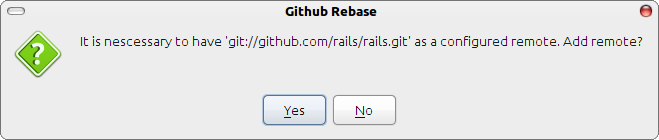
- In order to rebase onto the origin repository it is necessary to add it as new remote. But you’ll be prompted to add it automatically.
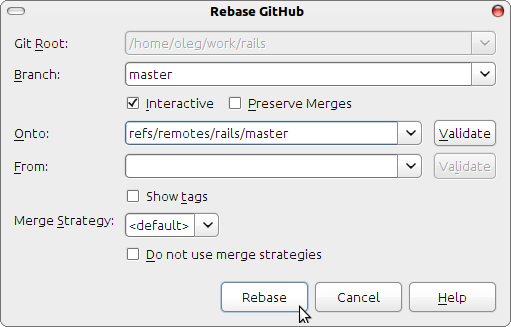
- After having your origin successfully configured you’ll be able to rebase your own fork.
And yet another small but useful feature is the ability to quickly browse your code on the Internet. Open in browser is available from the context menu.
All GitHub features are available even if you have your own GitHub installation (http://fi.github.com), just configure the GitHub host in IDE settings and voila, everything works out of the box!
The next major feature scheduled is the support for github pull requests and full roadmap is available here. Do not hesitate to let us know what you think about and if you’d like any other GitHub specific functionality to be added. Enjoy using GitHub with IntelliJ GitHub integration!
And watch this short screencast demoing creating a new GitHub repository from IntelliJ IDEA project and cloning an existing one as a new project (also available at JetBrains.TV).
-Develop with pleasure!
JetBrains Team

February 1st, 2011 at 5:50 pm
No video for iOS users? Weird!
February 2nd, 2011 at 5:51 am
Hey,
Thanks for the integration with Github, that’s awesome!
What about RubyMiwe, will this feature be integrated in to it?
Thanks,
Timur
February 2nd, 2011 at 8:04 am
Timur,
GitHub integration will be included into RubyMine 3.1.
February 3rd, 2011 at 6:58 pm
What we really need is git add -p
February 4th, 2011 at 2:50 am
Actually before commit you are shown with changed files to be added to the index, just select desired file, press Ctrl+D and voila, you can inspect all the changes in this particular file to be included. See for more details: http://www.jetbrains.com/ruby/webhelp/commit-changes-dialog.html
February 4th, 2011 at 8:12 am
Oleg, that’s another feature. “add -p” allows to select particular code chunks to be stored in the index and then committed.
February 7th, 2011 at 4:39 am
Yep, I know that it is not the exactly desired functionality, only the workaround was described.
February 18th, 2011 at 12:33 pm
Well, most of the time I end up working on many things at a time, all too minor to stash my stuff, create a new branch, work there and merge back. So I end up dis-entangling chucks within one file via -p (sometimes even need to split)… Therefore your workaround won’t work for me. Thanks for sharing anyway….
February 22nd, 2011 at 5:20 am
I was trying to import into github where you need to go Version Control >> Import into Version Control >> Share Project on GitHub
The login pop-up appears, enter details, try login and fails.
Am I doing something wrong?
I do have github account and I can log in through website no problems at all
February 22nd, 2011 at 5:27 am
OK, solved. Do not use whole email address just login name. Wonder why you cannot log with email address…
July 4th, 2011 at 2:04 am
If I use the Git context menu (or the Version Control->Git menu item) and select Pull changes… I am getting a dialogue box in which I can select which branch to merge and Remote. When I click the “Pull” button I am shown a modal progress indicator in which the bottom line says Password: - but there is not input field, and I am not given any opportunity to enter the password anywhere - how do I get around that?
I have already configured Github settings and can authenticate against github. I have also entered my git API token in my .gitconfig file so I can use the git command in my terminal without entering my github password all the time, and finally I have configured a ssh public key for github - but none of this have had any effect in Idea (using 10.5.1). What else should I try?
March 19th, 2012 at 9:52 am
Hi. The images links are broken. Can you fix them? Looks like a good post!
March 19th, 2012 at 4:39 pm
@mark, fixed! Thanks for noticing
