.NET Code Coverage in Two Clicks
February 19th, 2010 by KhalusovaIf you have ever dealt with .NET code coverage for NUnit tests, you surely know that it is quite a tricky thing to configure: you need to read docs to properly set up launching a command line coverage tool in your build script; read more docs and configure how reports should be gathered; then read docs again and specify all the needed arguments to be passed… well, not a task anyone would like to deal with.
Now imagine that you can forget all that tangled routine and spend more time doing whatever you like. That’s because starting with TeamCity 5.0 configuring coverage execution with NUnit becomes easy as pie.
All you need to do is to select the preferred coverage tool when creating or editing Build Configuration — NCover and PartCover are at your disposal; and specify its parameters. That’s it!
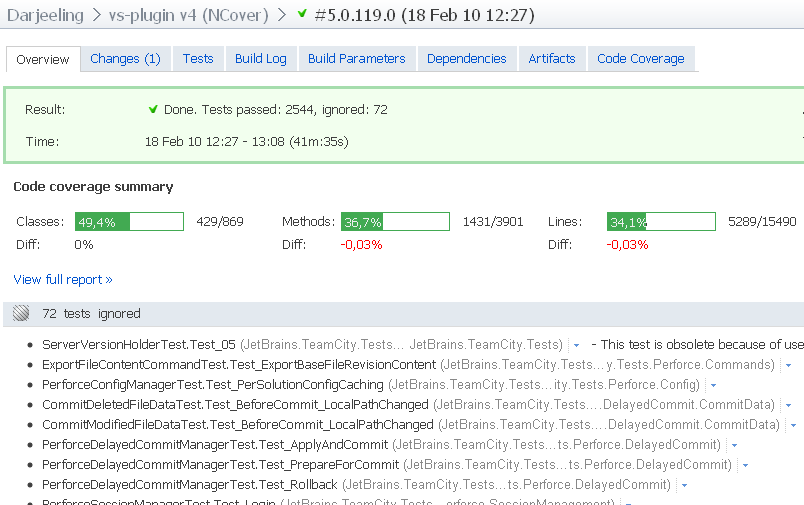
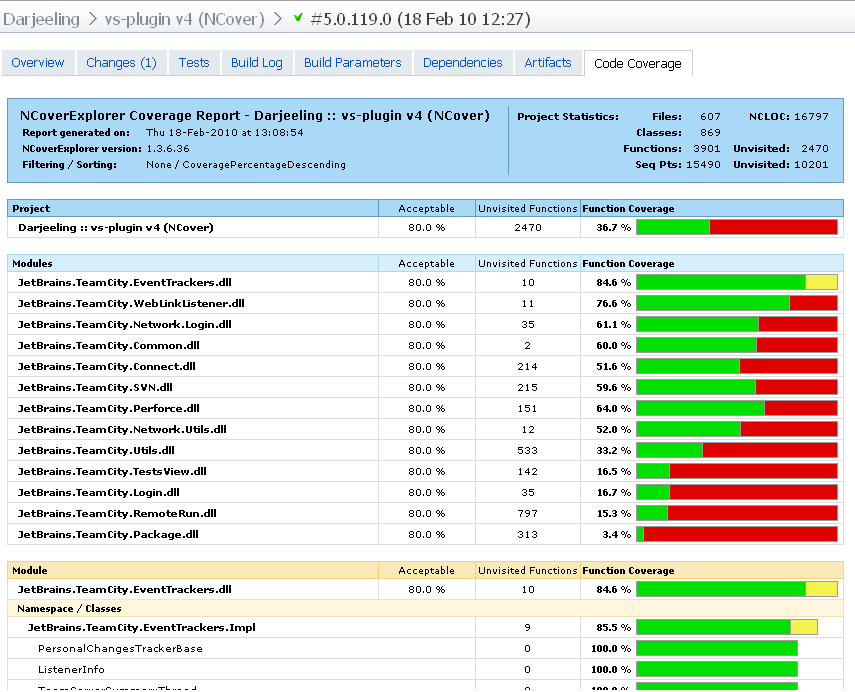
Just a few clicks to make TeamCity automatically add necessary arguments to NUnit tests, and ensure you’ll be able to view the results in the TeamCity. Enjoy!
Sincerely,
JetBrains TeamCity team.
Technorati tags: TeamCity, JetBrains, continuous integration, build management, NCover, PartCover, NUnit, agile development


February 19th, 2010 at 4:47 am
Very nice work, thanks.
Too bad it’s not that easy to get coverage working with a different runner. For example, I didn’t figure out how to use Rake runner + PartCover in TeamCity.
I’m using your nunitlauncher.exe from my rake file, by passing the specifics /partcover* switches, but then it seems pretty difficult to integrate the coverage results in TeamCity. I tried to use the importdata message without any success.
February 19th, 2010 at 8:47 am
This sounds great! But I can’t get the sln2008 runner to work with PartCover. Any chance you’ll be updating the docs to include the .NET Coverage information (http://confluence.jetbrains.net/display/TCD5/sln2008)?
February 19th, 2010 at 10:15 am
Clicking is easy, but the main issue is to specify necessary parameters. Hope that the docs will be updated.
February 25th, 2010 at 11:41 am
2Romain Verdier: We are planning to support reporting .NET coverage from any runner via service messages in TeamCity 5.1. Don’t hesitate to vote for the corresponding issue http://youtrack.jetbrains.net/issue/TW-10918 .
March 1st, 2010 at 8:46 am
This simply doesn’t work, and it seems nobody else has got it to work either. At least not with PartCover.
This feature really needs documentation, because I’ve yet to see a report from someone who gets the same nice code coverage statistics that you are showing in this blog post.
March 5th, 2010 at 4:35 am
The docs about configuring NCover and PartCover for NUnit are now updated.
http://confluence.jetbrains.net/display/TCD5/NCover
http://confluence.jetbrains.net/display/TCD5/PartCover
March 22nd, 2010 at 9:42 am
I haven’t been able to get NUnit working, either, though my current configuration is simpler (just trying to get NUnit working, not trying NCover yet). I get compilation errors, even though my solution builds fine in the IDE:
Window1.xaml.cs(14,7): error CS0246: The type or namespace name ‘NUnit’ could not be found (are you missing a using directive or an assembly reference?) Window1.xaml.cs(28,10): error CS0246: The type or namespace name ‘Test’ could not be found (are you missing a using directive or an assembly reference?) Window1.xaml.cs(28,10): error CS0246: The type or namespace name ‘TestAttribute’ could not be found (are you missing a using directive or an assembly reference?)
One difference is that I have the NUnit assemblies in a folder that is in SVN, because I need to build solutions on multiple computers that might not have the same version of NUnit, or have it in the same directory.
I have also installed NUnit onto my test server, but the builds still fail with compilation errors. I also tried rebooting my machine after installing NUnit but that didn’t help.
March 22nd, 2010 at 10:22 am
Dave, please check your Visual Studio project reference to NUnit uses hintPath to nunit.framework.dll that is checked out from subversion (but not to the one from GAC). Please either try running msbuild.exe solution.sln from the build agent under build agent service running user account.
March 22nd, 2010 at 11:13 am
Thanks for the reply, Eugene! I checked my project file and it all looks good. The HintPath does reference my external libs folder from SVN. I also executed msbuild from the vs2008 command prompt and used /t:Rebuild to make sure I was rebuilding the solution. Everything checked out fine, but I still can’t get my build to work in TeamCity.
Here is a link to my configuration screens: http://bit.ly/cy2KDM